Why Variable Fonts Are Finally the Default? I still vividly remember the specific headache of managing typography for content-dense websites…

Magic Tropic Font
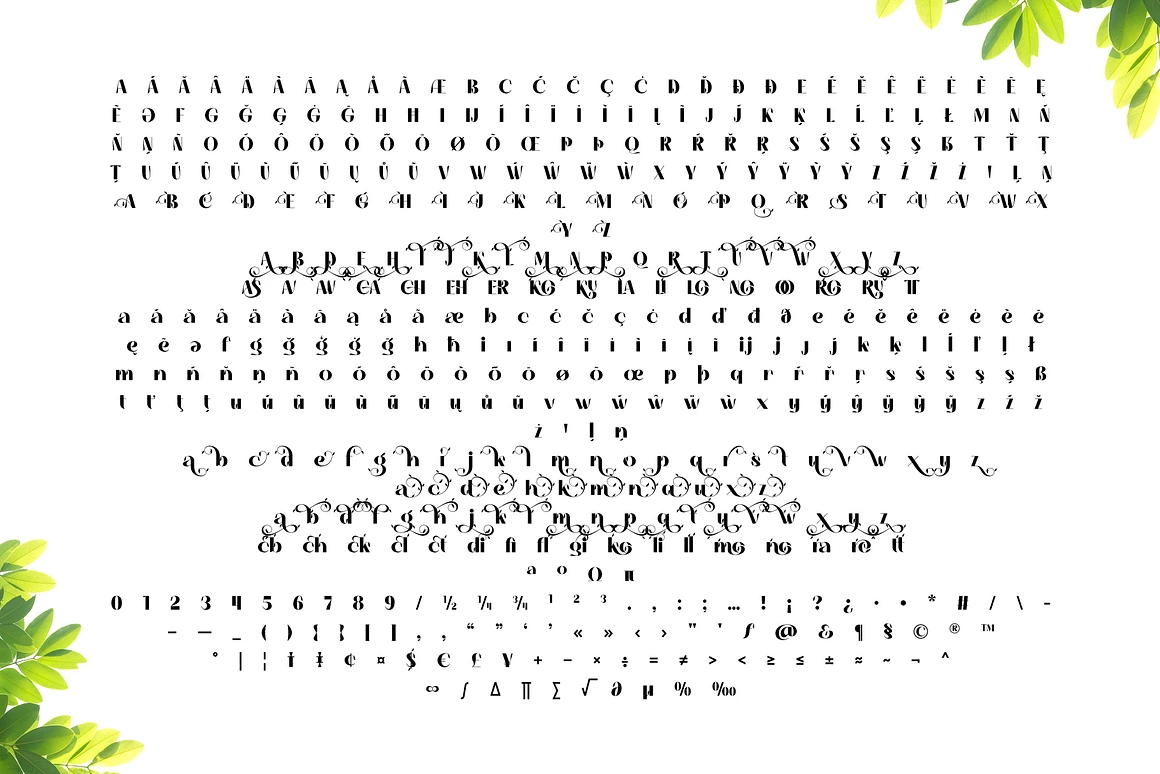
Font Preview
DESCRIPTION
Magic Tropic is a unique display font inspired by the shape and beauty of tropical plants. Its elegant and artistic design brings a natural and exotic feel, making this font the perfect choice for various design projects that want to convey a fresh and natural impression.
Purchase Package Details:
– File Format: OTF, TTF, WOFF, WOFF2
Feature:
– Ligature: Artistically connected letter combinations for a smoother and more aesthetic appearance.
– Swash: Decorative lines on the letters that add a touch of elegance.
– Stylistic Set: Variations in letter styles to allow for errors in design.
_ Multilingual: Supports multiple languages for international use.
With Magic Tropic, you can bring a charming tropical touch to your designs, whether for branding, invitations, posters or social media. Get this font and enjoy the natural beauty in each letter.
Magic Tropic Font
By completing this purchase, you agree to our
Yes. As long as you purchase the appropriate license (Desktop, Web, App, etc.), you are allowed to use the font in commercial works such as logos, packaging, and advertising.
Each download includes:
Font files in
.OTFor.TTFformats (depending on license)Webfonts (
.WOFF,.WOFF2) if Web License is selectedEULA (license agreement)
Font installation & usage guide
- License
Only if you purchase a Webfont or App License. Desktop licenses do not allow embedding in digital platforms.
Yes, if you purchase the font on behalf of your client, you must ensure the license is in their name. One license = one user/client.
Yes. Please contact us at support@authentype.com to request a custom or extended license.
No. Modifying font files is not permitted under standard licenses. If you need customization, please contact us for permission or a custom agreement.
Due to the digital nature of fonts, all sales are final. Please make sure to test free versions or read the details before purchase.
Yes! You can explore our collection of free fonts here.
We provide a PDF guide with every purchase. Generally:
macOS: Double-click
.otf→ “Install Font”Windows: Right-click
.otf→ “Install”
You can re-download your purchase from your Authentype account at any time. If you need help, contact our support team.
TRY BEFORE YOU BUY
Download our high-quality free fonts and test them in your projects. 👉 BROWSE FREE FONTS
Why Brands Are Ditching Stock Footage for AI? I remember a rainy Tuesday afternoon last November, sitting in a drafty…
New Products
- Sale!
- Sale!
Top Products
- Sale!
- Sale!
On Sale
- Sale!
- Sale!
- Sale!


Reviews
There are no reviews yet.